01/Blog
All articlesHow Run keeps recording with the screen off, on Android and iPhone
Android needs a foreground service of type location. iPhone needs the location background mode. Then the app has to notice when fixes stop arriving.
By Matthew Kay//7 min read
Run, the running app in MGKFitness, keeps recording with the phone locked because each platform gets the one setting it needs: on Android, a foreground service of type location with a wake lock; on iPhone, the location background mode with background updates on. Both go through the geolocator Flutter plugin, with no paid background-location plugin. The harder half is noticing when fixes stop anyway, because nothing reports it as an error.
What goes wrong when a running app's screen locks?
Three things, and none of them throws.
- Android stops delivering location to a backgrounded app. Silently: no stream error, no exception. We reproduced it on an emulator. The screen kept saying "Recording", the signal bars held their last value, and the average pace climbed as elapsed time divided a frozen distance.
- iOS suspends timers. It keeps delivering location to an app with the background mode declared, but our first clock was a one-second ticker. A run with the screen locked came back minutes short, and the pace was wrong to match.
- Location can be unusable without being refused. With Location Services switched off,
requestPermissioncan still return a granted permission, and the stream then delivers nothing. With iPhone's Precise Location off, every fix arrives at kilometre-scale accuracy and is thrown away by the recorder's 50 m floor. A run would sit on "Acquiring GPS" for its whole length and save 0 m.
How do you keep location running on Android with the screen off?
A foreground service. geolocator_android already declares one with foregroundServiceType="location". The app adds the permissions it needs (abridged from AndroidManifest.xml):
<uses-permission android:name="android.permission.ACCESS_FINE_LOCATION"/>
<uses-permission android:name="android.permission.ACCESS_COARSE_LOCATION"/>
<uses-permission android:name="android.permission.FOREGROUND_SERVICE"/>
<uses-permission android:name="android.permission.FOREGROUND_SERVICE_LOCATION"/>
<uses-permission android:name="android.permission.POST_NOTIFICATIONS"/>
<uses-permission android:name="android.permission.WAKE_LOCK"/>
FOREGROUND_SERVICE_LOCATION is the typed permission Android 14 requires on top of the untyped one. POST_NOTIFICATIONS is what lets the service's notification appear from Android 13. WAKE_LOCK keeps fixes arriving as they happen, not in a burst when the device next wakes.
Then the settings handed to Geolocator.getPositionStream:
LocationSettings _androidRunSettings() => AndroidSettings(
  accuracy: LocationAccuracy.best,
  distanceFilter: 0,
  intervalDuration: const Duration(seconds: 1),
  foregroundNotificationConfig: const ForegroundNotificationConfig(
    notificationTitle: 'Recording your run',
    notificationText: 'Run is tracking your route, distance and pace.',
    notificationChannelName: 'Run recording',
    enableWakeLock: true,
    setOngoing: true,
  ),
);
setOngoing is there because a runner who swipes the notification away by accident would be swiping away their run.
ACCESS_BACKGROUND_LOCATION is not requested. A foreground service of type location, started while the app is in the foreground, keeps receiving location without it. A run always starts with a tap on Start, so the app is always in the foreground when the service starts. Asking for background location would have brought a Play Store review and a far more alarming dialog, for a capability Run doesn't use.
Play still asks about the service. The Play Console's foreground-service declaration wants a task (ours is Other, under Background location updates) and a link to a video. Ours was recorded on an Android 16 emulator from a release build, with the GPS fed along a road route.
How do you keep location running on iPhone with the screen locked?
Two pieces. The background mode in Info.plist:
<key>UIBackgroundModes</key>
<array>
  <string>location</string>
</array>
And settings that use it:
LocationSettings _iosRunSettings() => AppleSettings(
  accuracy: LocationAccuracy.best,
  activityType: ActivityType.fitness,
  distanceFilter: 0,
  pauseLocationUpdatesAutomatically: false,
  allowBackgroundLocationUpdates: true,
  showBackgroundLocationIndicator: true,
);
The app asks for While Using permission only, never Always. For the same reason as on Android, that is enough: the run starts in the foreground and the background mode carries it on. The indicator setting shows the blue location pill while it records, which the App Review notes point to.
The clock had to change too. Elapsed time is now read off the wall clock, minus anything the runner paused (abridged):
Duration get elapsed {
  final started = _startedAt;
  if (started == null) return Duration.zero;
  final until = _notCountingSince ?? _endedAt ?? _now();
  final total = until.difference(started) - _pausedTotal;
  return total.isNegative ? Duration.zero : total;
}
The screen's one-second timer only repaints. It never counts.
What if the OS kills the app mid-run anyway?
Every fix is written to the phone's SQLite database (Drift) before it is shown. The run's row is created on Start with endedAt empty, and that empty column is the recovery marker. At launch, recoverInterruptedRun finds the row and finishes it from the stored trace, ends it at the last recorded fix, and adds a note saying it was recovered. A row with no points is deleted, not saved as 0.00 km.
Before that launch step existed, a killed run kept every point on disk and never showed up: 200 points stored, 0 runs in the log.
How does the app tell the runner what's happening?
One status line, in a fixed order:
String get _statusLabel {
  if (_problem != null) return 'Not recording';
  if (_acquiring) return 'Acquiring GPS';
  if (!_recording) return 'Paused';
  if (_signalLost) return 'No signal';
  return 'Recording';
}
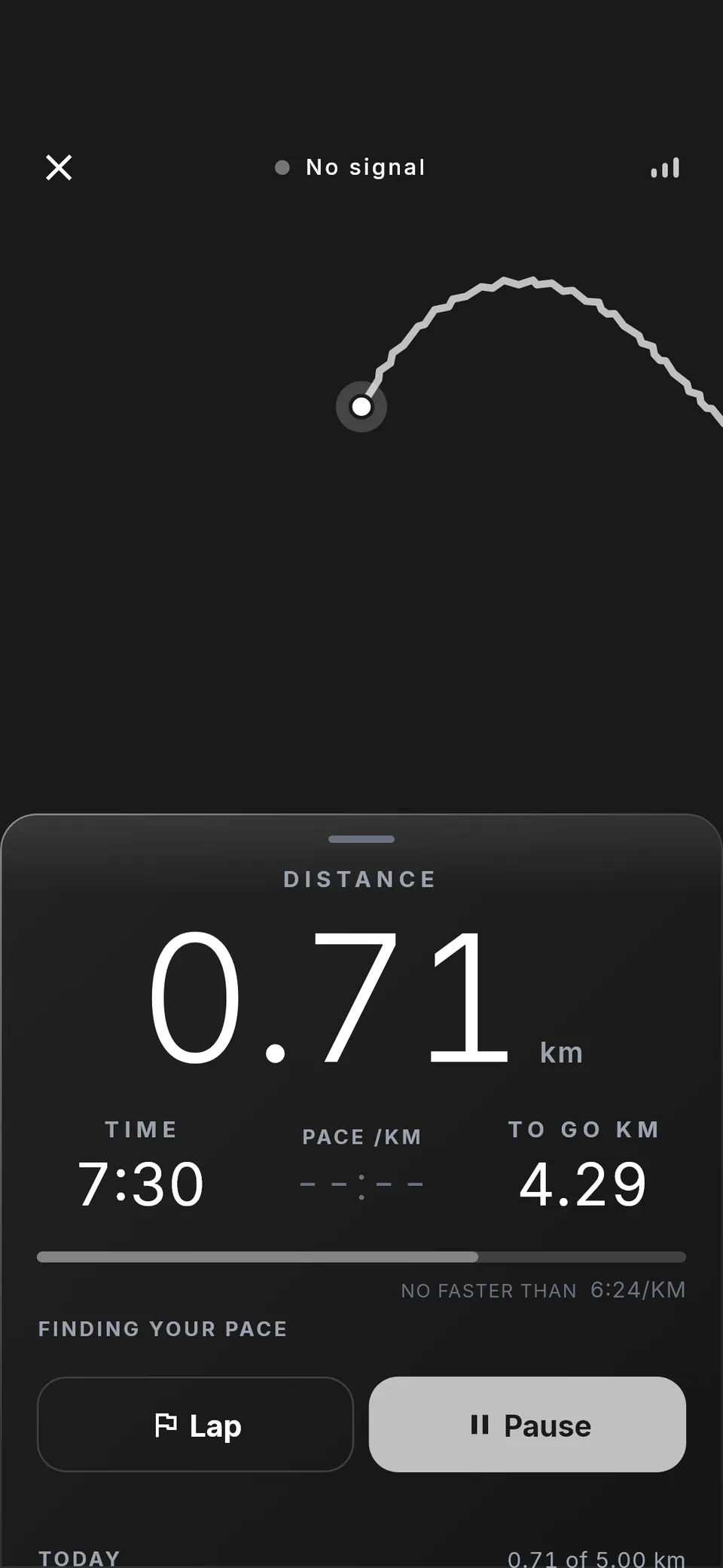
"No signal" covers the state nothing reports. _signalLost is true once the newest fix arrived 15 seconds ago or more. Fixes land about once a second, so a 15-second gap is not jitter, and it rides out the few seconds a phone loses switching between cell and GPS positioning. The recorder, which owns the clock, measures when a fix arrived rather than the timestamp it carries.
When it trips, the label changes, the pulse stops, the signal bars empty, the live pace shows dashes and the average greys out. Before this, cutting the GPS feed on an emulator left three bars and "Recording" on screen, and ninety seconds took the average from 8:01 to 11:05. The phone also gives one haptic as the signal goes and a lighter one when it returns, for a runner who can't look.
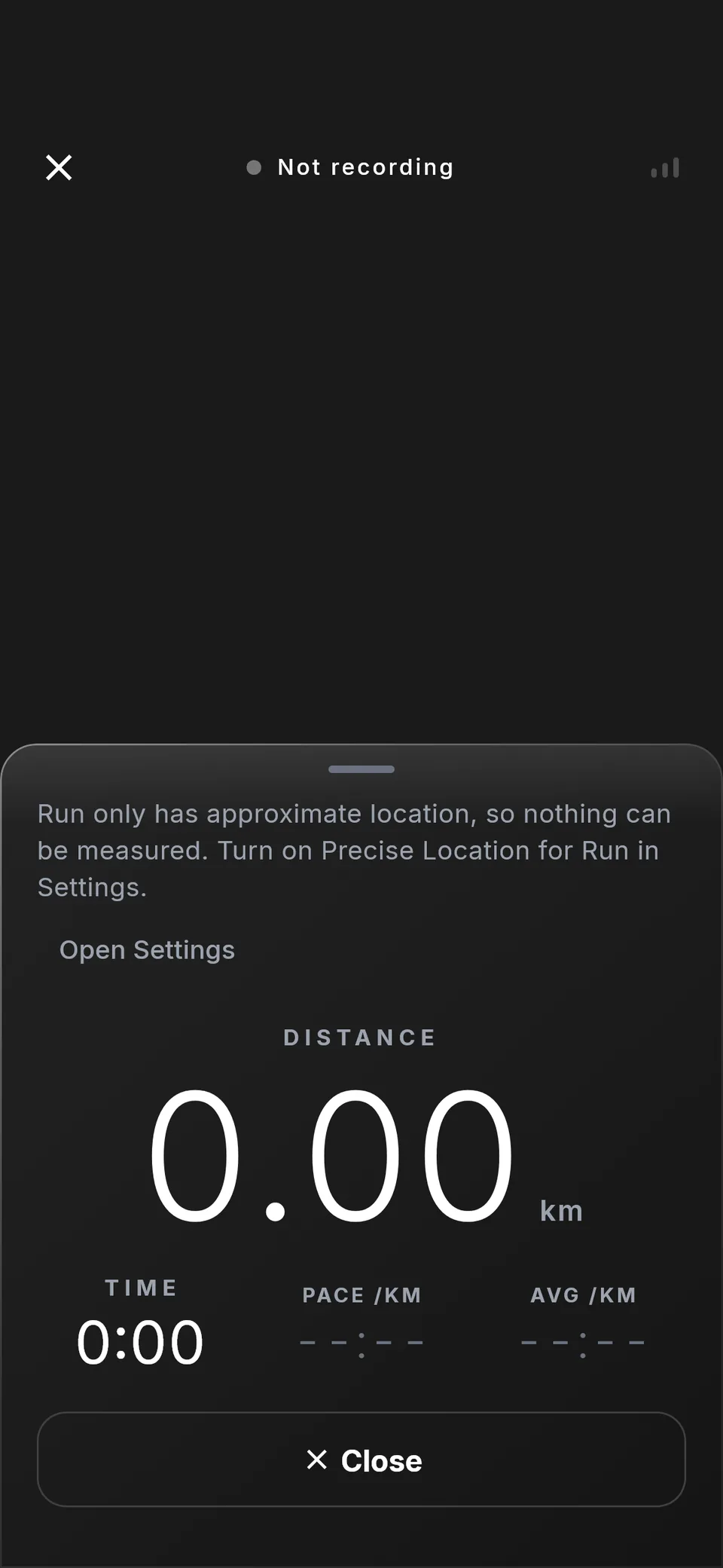
The problems that stop a run each name their own fix, because the fixes differ:
- Location Services off: the written path to the switch (Settings → Location on Android, Settings → Privacy & Security → Location Services on iPhone). No button, because the app's settings link can't reach that switch.
- Permission refused: Continue, which shows the system prompt again.
- Refused for good: Open Settings. Asking again would do nothing.
- Approximate location only: Open Settings, and a line saying to turn on Precise Location. This one is iPhone only. On Android,
geolocatorreports the accuracy as unknown whatever the grant, so that gap stays open. - Location failing mid-run: the plugin's error is forwarded on the stream, not dropped, and the screen says nothing is being added to the run.
A phone in an armband is a locked phone, so the figures go to the lock screen too: a Live Activity on iPhone (iOS 16.2 and later) and a notification on Android. A wrapper around the recorder sends distance and pace every four seconds, because the in-run screen is exactly what isn't there when the phone is locked. Each platform counts the clock by itself. On Android it is a second notification: the plugin's channel has no importance and private visibility, which a lock screen won't show, and a channel's importance can't be changed once made.
How was it tested?
- Android: the silent stop was reproduced on an emulator before the fix, and the merged manifest was checked after it. The lock-screen notification was run on an emulator: "0.57 km · 4:18 /km" with a clock matching the in-run screen, gone on discard.
- iPhone: the code says background location can't be checked in a simulator, so it was checked on a TestFlight build: the run kept recording with the screen locked. The Live Activity was seen on build 29.
- A real run: two phones in two pockets. Run recorded 10.18 km in 58:28. Strava, on the other phone, recorded 10.01 km in 57:47.
- Automated tests: a widget test jumps the clock 12 minutes 30 seconds without delivering the ticks in between, and expects 12:30 on screen. Others starve the screen of fixes and expect "No signal" and dashed pace, check one message per problem, and recover a run that never got a Finish.
One lesson from the iPhone check: it was done, and the result lived nowhere, so the release plan went on calling it an untested data-loss path for a fortnight. Write device results down.
What came of it?
Build 29 went to App Review and Google Play on 2 October 2026. The Play release is live. The recorder sits behind a RunRecorder interface, so if real use shows dropped points, moving to flutter_background_geolocation is a one-class change, not a rewrite.
The short version
- Android: a foreground service of type
locationthroughgeolocator'sForegroundNotificationConfig, withFOREGROUND_SERVICE_LOCATION,POST_NOTIFICATIONSandWAKE_LOCK. SkipACCESS_BACKGROUND_LOCATIONif the run starts from a tap. - iPhone:
UIBackgroundModesset tolocation,allowBackgroundLocationUpdates: trueandpauseLocationUpdatesAutomatically: false. While Using permission is enough. - Count time from the wall clock, never from a timer.
- Write every fix to disk before showing it, and finish interrupted runs at launch.
- Treat 15 seconds without a fix as a state, and say "No signal", because nothing will throw.
02/More build notes